Clone CRM is the world's first CRM managed solely by Clones. Tell your Clone what happened, by voice or chat, and it does the CRM work. No more forms, no more endless clicking. And it doesn't stop at order entry: your Clone helps you get deals over the line and keep customers happy.
Just got off with Dana Lee at Harbor Logistics. She wants pricing for 25 seats and a security review. Follow up Tuesday.
Done. Here's what I did:
Logged the call on Harbor Logistics, New Business
Moved the deal to Proposal (70%, Best Case)
Added a security-review next step
Created a follow-up task for Tue, Nov 3
Open the deal ↗
Deal strategy
What's at risk this quarter, and what should I do about it?
Three deals need you this week:
Harbor Logistics, $48K: no touch in 16 days. I drafted a check-in for Dana.
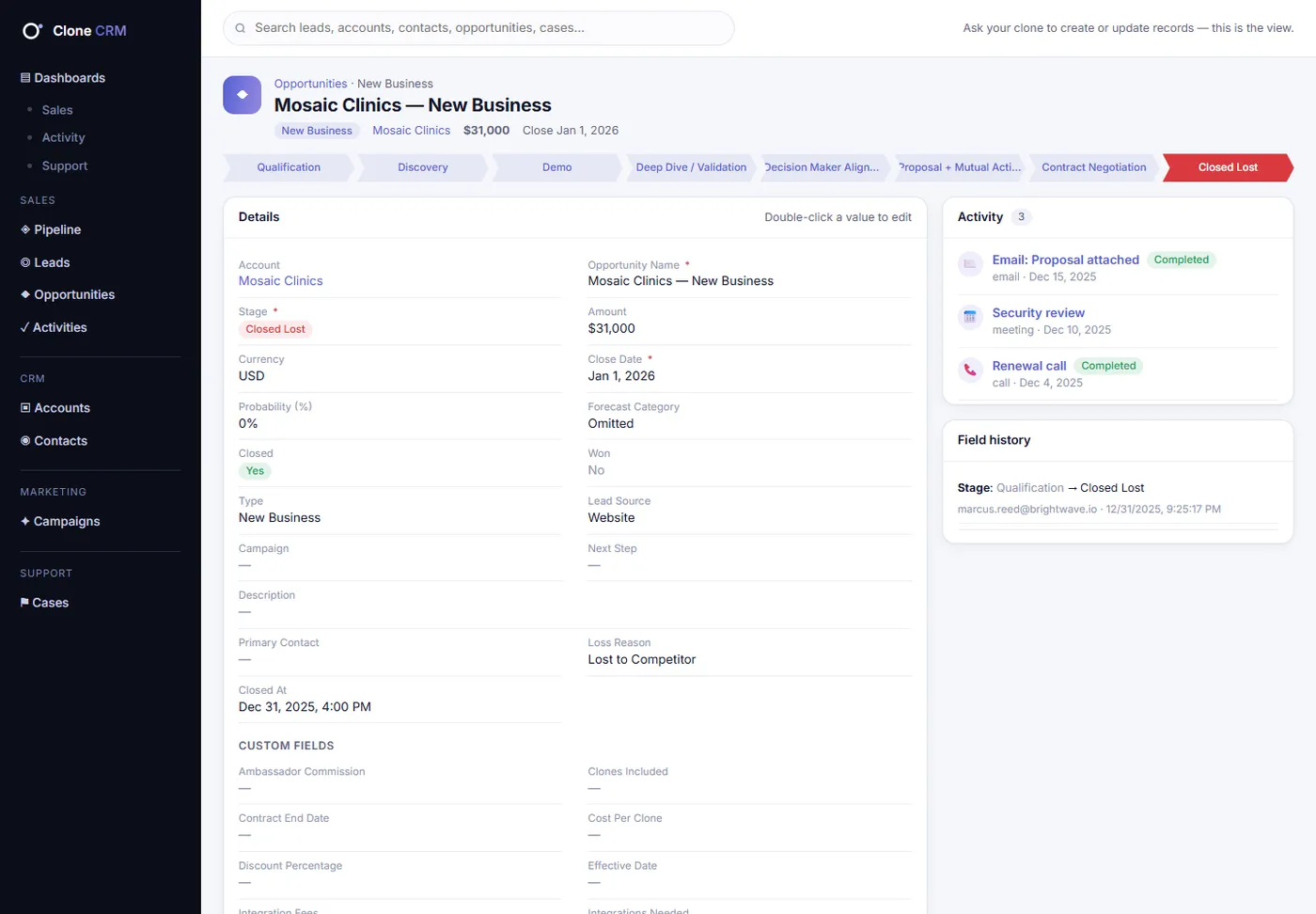
Mosaic Clinics, $31K: stuck in Demo 2× longer than usual. Suggest an exec sponsor call.
Keystone Realty: closes in 9 days with no next step. Want a mutual action plan?
Open the at-risk list ↗
Support
Open an urgent case for Bluepeak Health. Their calendar invites stopped syncing this morning.
Opened case #00001721 (Urgent, Integration).
Mei Tanaka added as the contact
Internal comment with the details
Two other Bluepeak cases are open. Want me to link them?
Open the case ↗
Marketing
Which of our sends this quarter actually turned into pipeline?
Opens averaged 23%.
“Voice Commands Are Here” led at 29%
“Customer Summit 2026” touched new pipeline
Chart attached, with the Activity dashboard
See the chart ↗
Talk to your Clone…
1skill runs the whole CRM
0forms to fill in
9dashboards on day one
83reports, all in chat too
~7 sfor a typical multi-step ask
The old way is the problem
The CRM was never the problem. The typing was.
Every CRM on the market assumes people will type everything in. They don't, so the data goes stale and the reports lie. Clone CRM flips it: your Clone keeps the CRM current as part of its job.
Every other CRM14clicks and forms
1Open the CRM
2Search for Harbor Logistics
3Open the account
4Find the opportunity
5Click Log a Call
6Type the notes
7Pick the call type
8Save
9Edit the stage
10Pick Proposal
11Update probability
12Save
13Click New Task
14Set the date and save
…then do it again after the next call. And the next.
vs
Clone CRM1sentence
“Just got off with Dana Lee at Harbor Logistics. She wants pricing for 25 seats and a security review. Follow up Tuesday.”
Logged the call on Harbor Logistics, New Business
Moved the deal to Proposal (70%, Best Case)
Added a security-review next step
Created a follow-up task for Tue, Nov 3
Done before you've left the parking lot.
Your Clone has you
Not just order entry. A partner on every deal.
The same Clone that logs the call can tell you which deals are slipping and what to do next, and which customers need you today.
The busywork
Order entry, gone.
Leads, contacts, deals, cases, campaigns, tasks and notes. Your Clone creates and updates them as you talk, and logs its own calls, emails and meetings as it works.
Create, update, convert
Log activity from the conversation
Ask before bulk changes or deletes
The deals
A closing partner.
Ask what's at risk and get names, reasons and a next move. Your Clone spots stuck deals, deals going dark and deals closing without a plan, then drafts the follow-up.
At-risk and going-dark deals
Forecast and coverage on demand
Prep for any call in seconds
The customers
Support that remembers.
Cases, comments and history on every account. Your Clone opens the case, links the related ones, flags the overdue work and tells you which customers need a call today.
Cases with full history
Aging and service targets
Accounts at risk, ranked
How it works
Talk. Don't click.
01
Ask
Say it the way you'd tell a teammate, by voice or chat. One ask can carry several steps.
Your CloneClone CRM on
Support
Open an urgent case for Bluepeak Health. Their calendar invites stopped syncing this morning.
Opened case #00001721 (Urgent, Integration).
Mei Tanaka added as the contact
Internal comment with the details
Two other Bluepeak cases are open. Want me to link them?
Open the case ↗
Talk to your Clone…
02
Your Clone does it
One skill, Clone CRM, with a CRM brain behind it that knows your fields, stages, record types and custom fields. It finds the right records, asks when a name is ambiguous, and does every step.
crm.clone.org
03
You look, if you want
Replies come back with a summary and secure one-time links. Click and you land on the record at crm.clone.org, already signed in.
crm.clone.org
Charts in chat
Ask for a number. Get the chart.
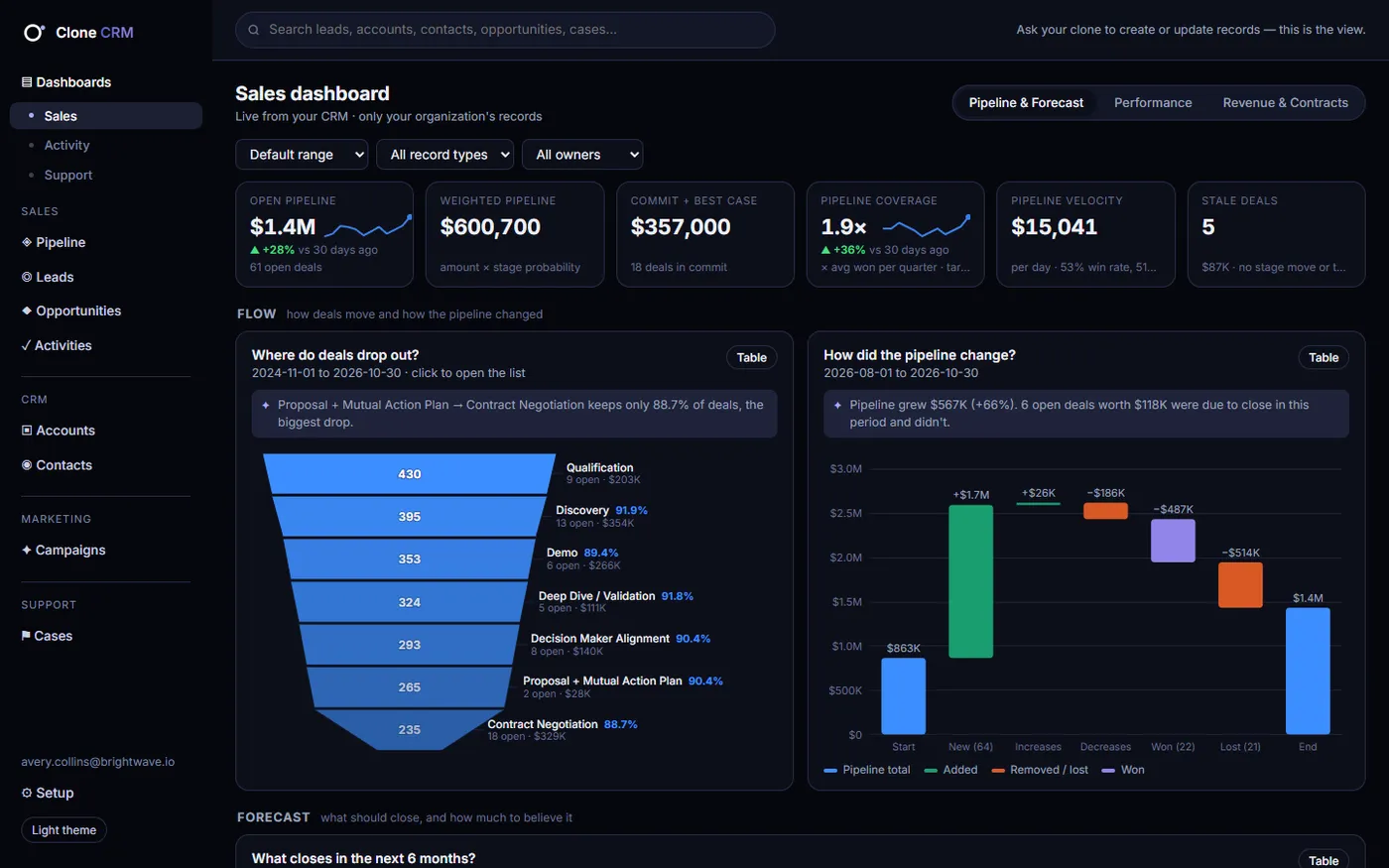
Every dashboard report also works in conversation. Your Clone answers with the numbers, a chart and a link to the right dashboard.
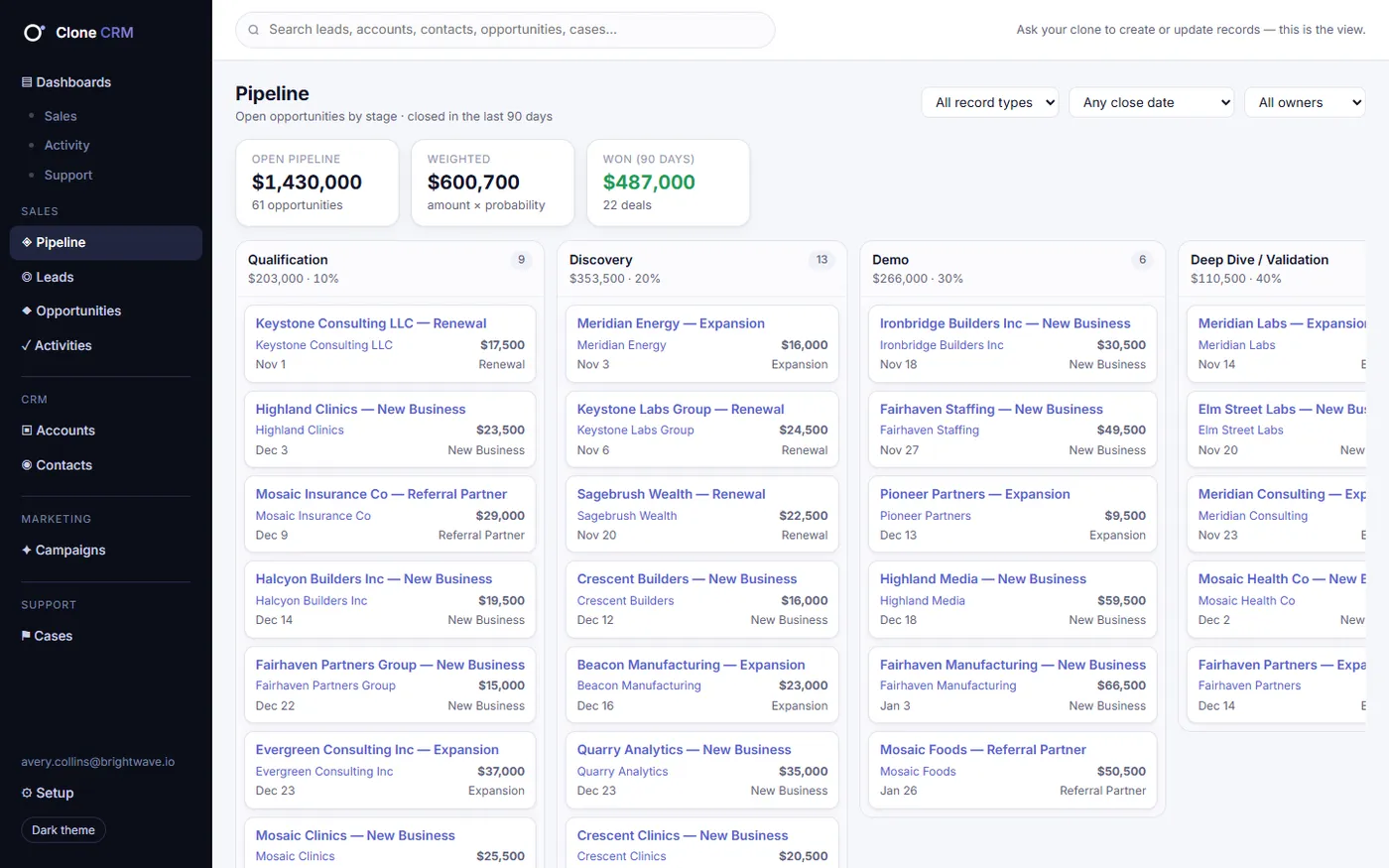
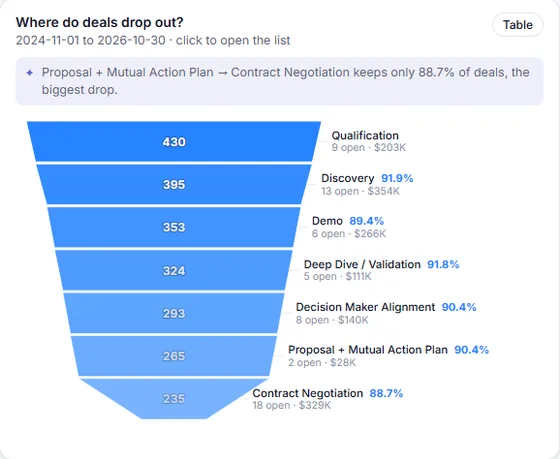
What's our open pipeline by stage?
$1.43M open across 61 deals. Contract Negotiation holds the most (18 deals).
Open the Pipeline & Forecast tab ↗
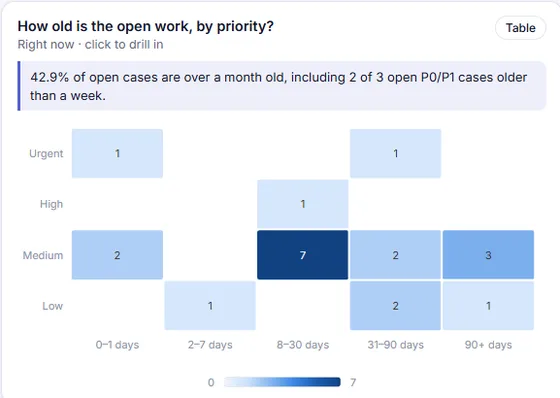
Which urgent or high cases are overdue?
2 urgent/high cases are past target; the oldest is 83 days. Most open work is Medium, 8–30 days old.
Open Support · Health ↗
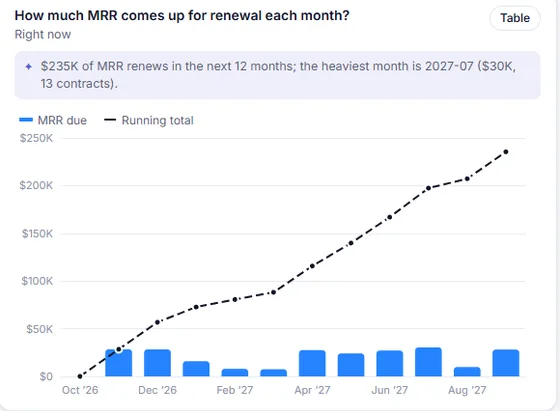
What renews next quarter?
31 contracts worth $72.7K a month renew November through January. November is the heaviest month.
Open Revenue & Contracts ↗
Screens and examples use a fictional demo company with generated data.
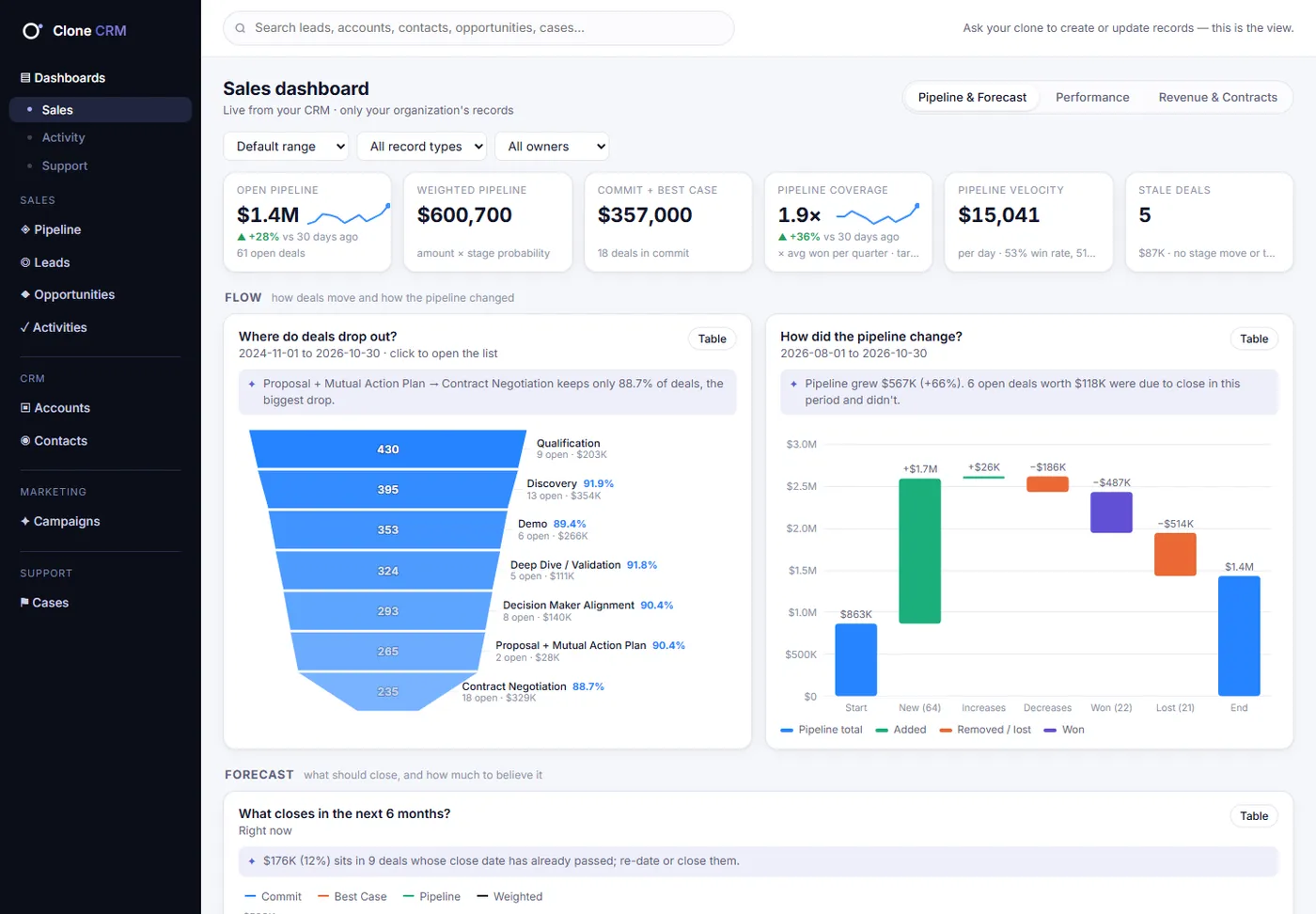
Nine dashboards
Zero report building.
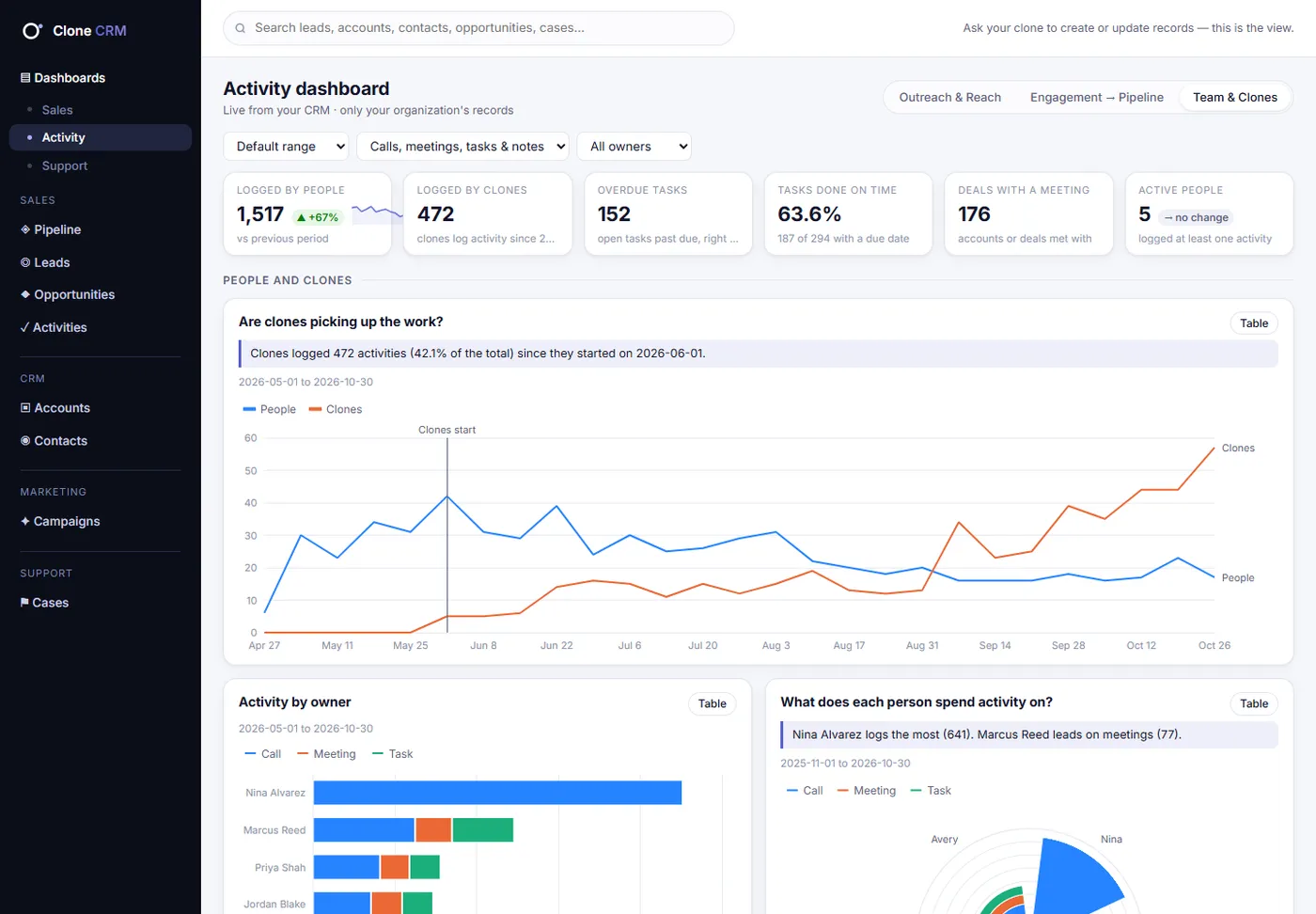
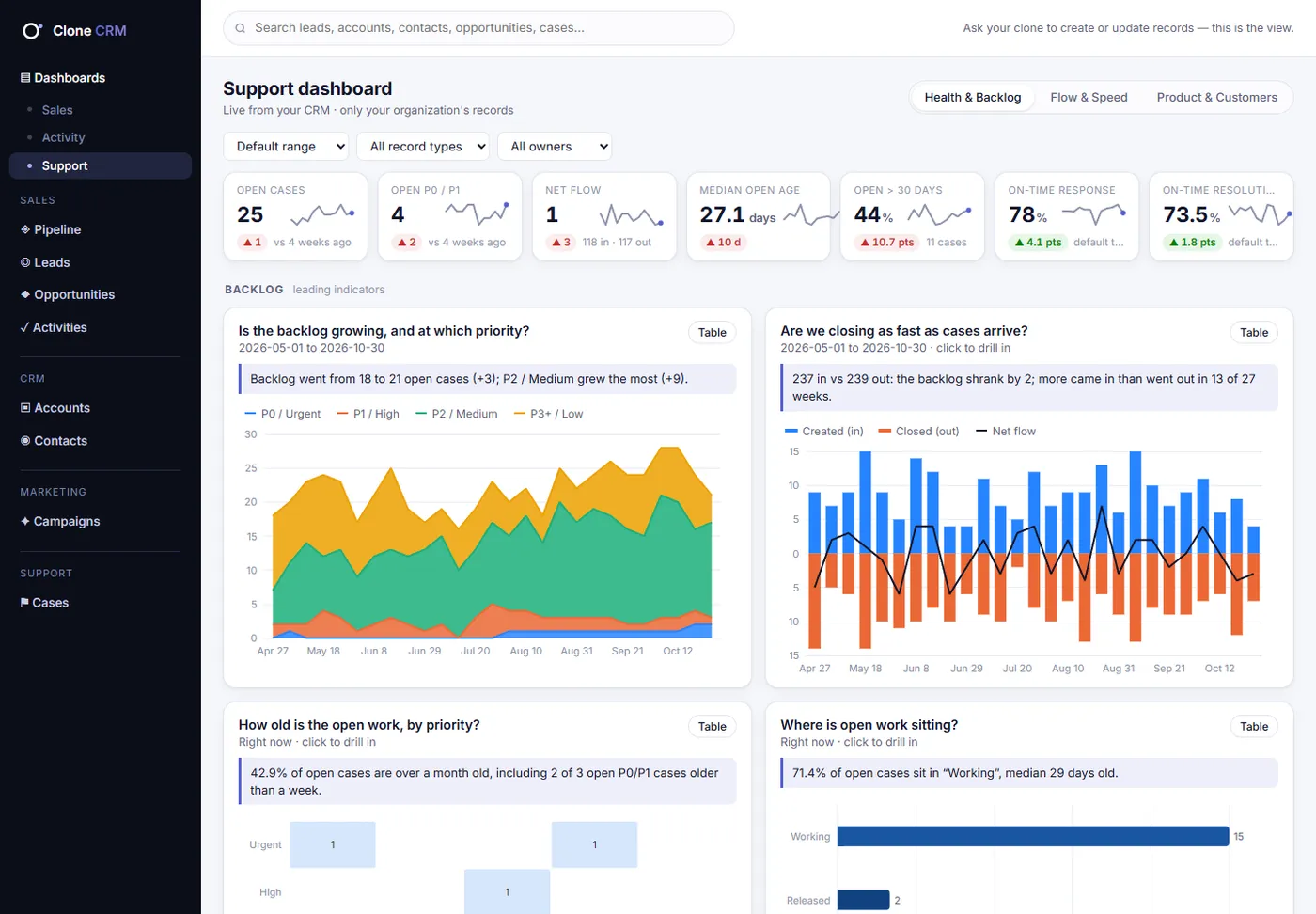
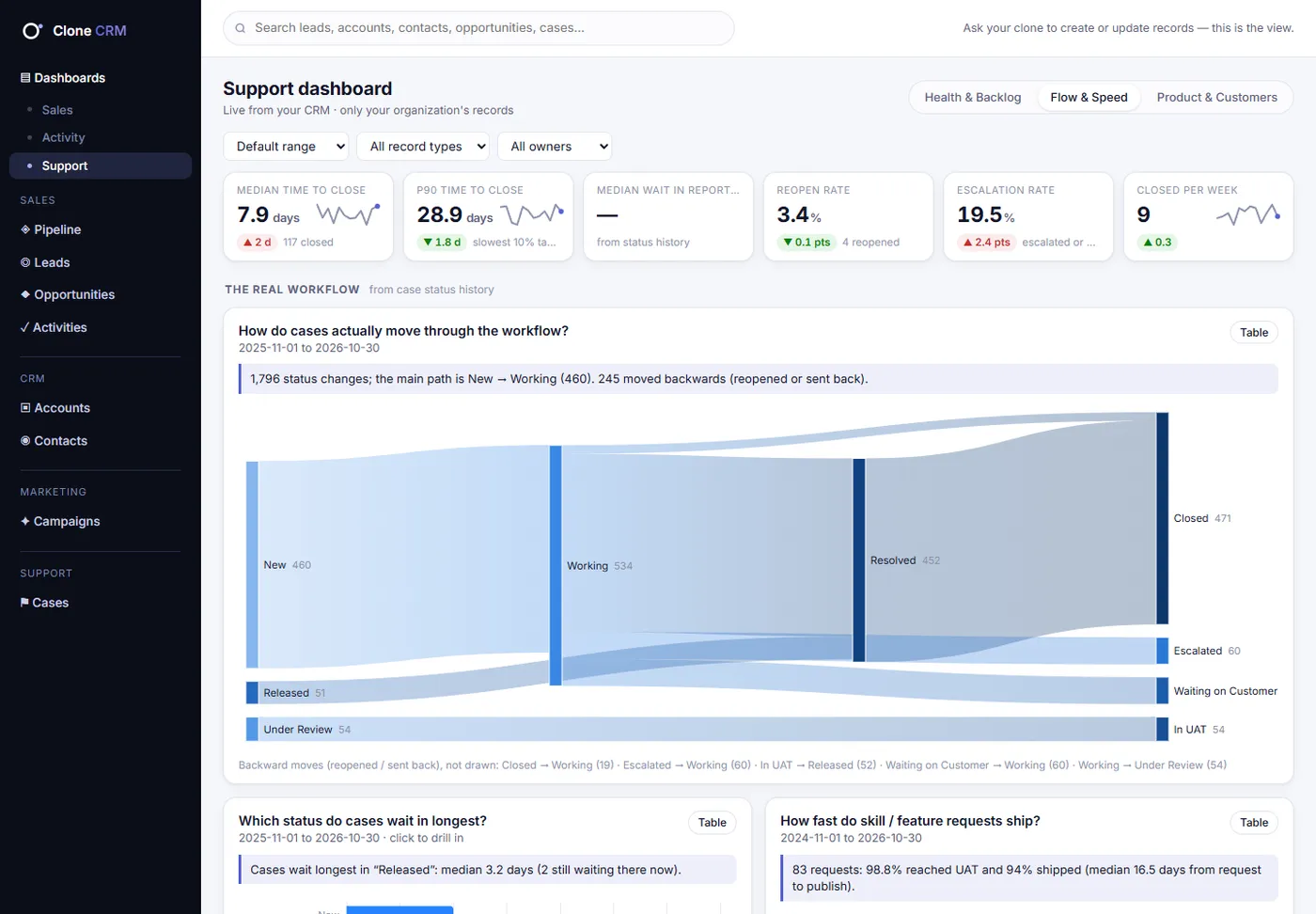
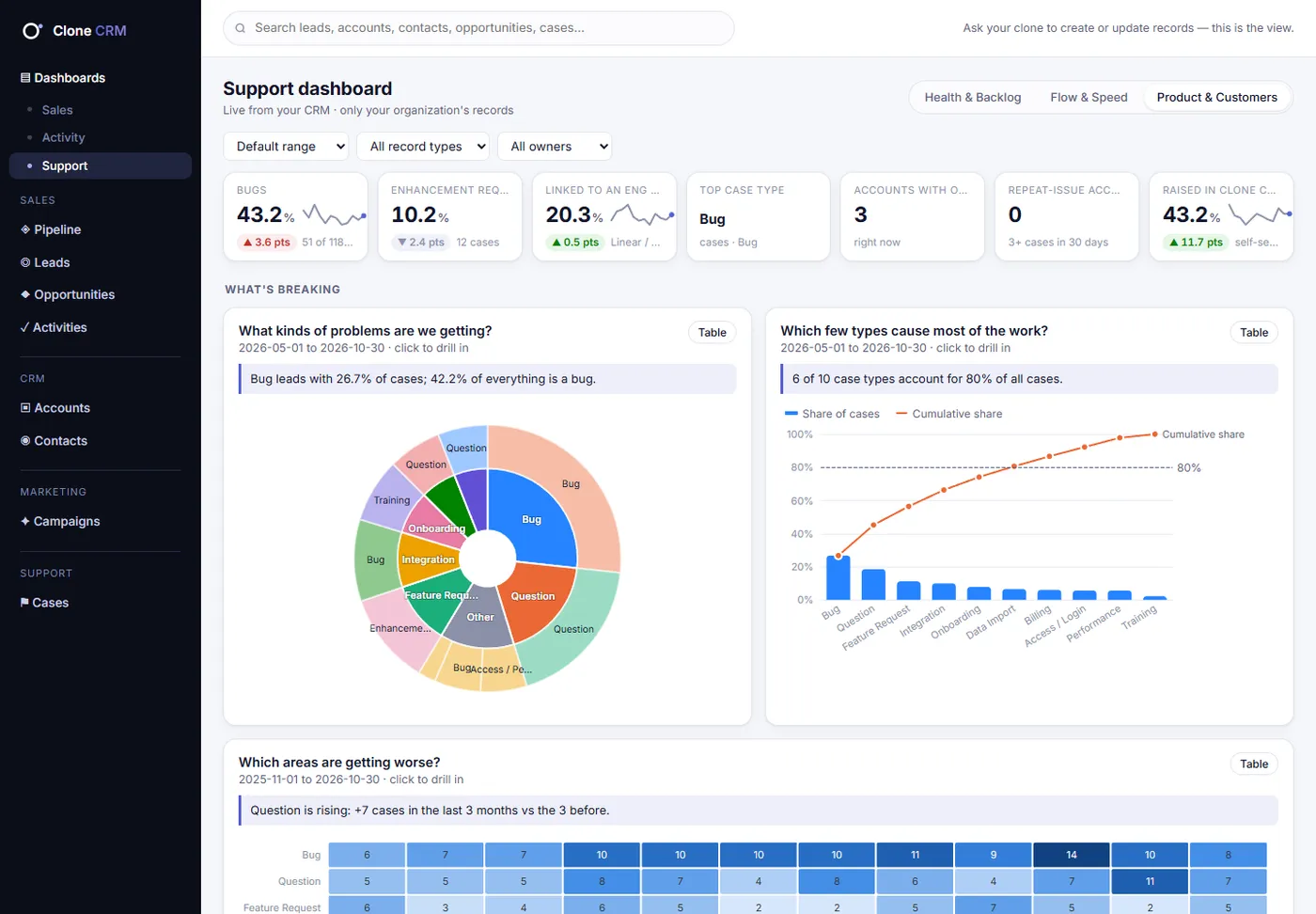
Sales, Activity and Support, three tabs each. Every chart title is a question, every chart has a written answer, and every tab ends with a to-do list.
Sales · Pipeline & Forecast
What will close, and can we believe it?
Funnel with the biggest drop called out · Pipeline waterfall · 6-month forecast by category · Big, stuck deals bubble chart
To-do list: At-risk deals, with the reason next to each
crm.clone.org/dashboards/sales
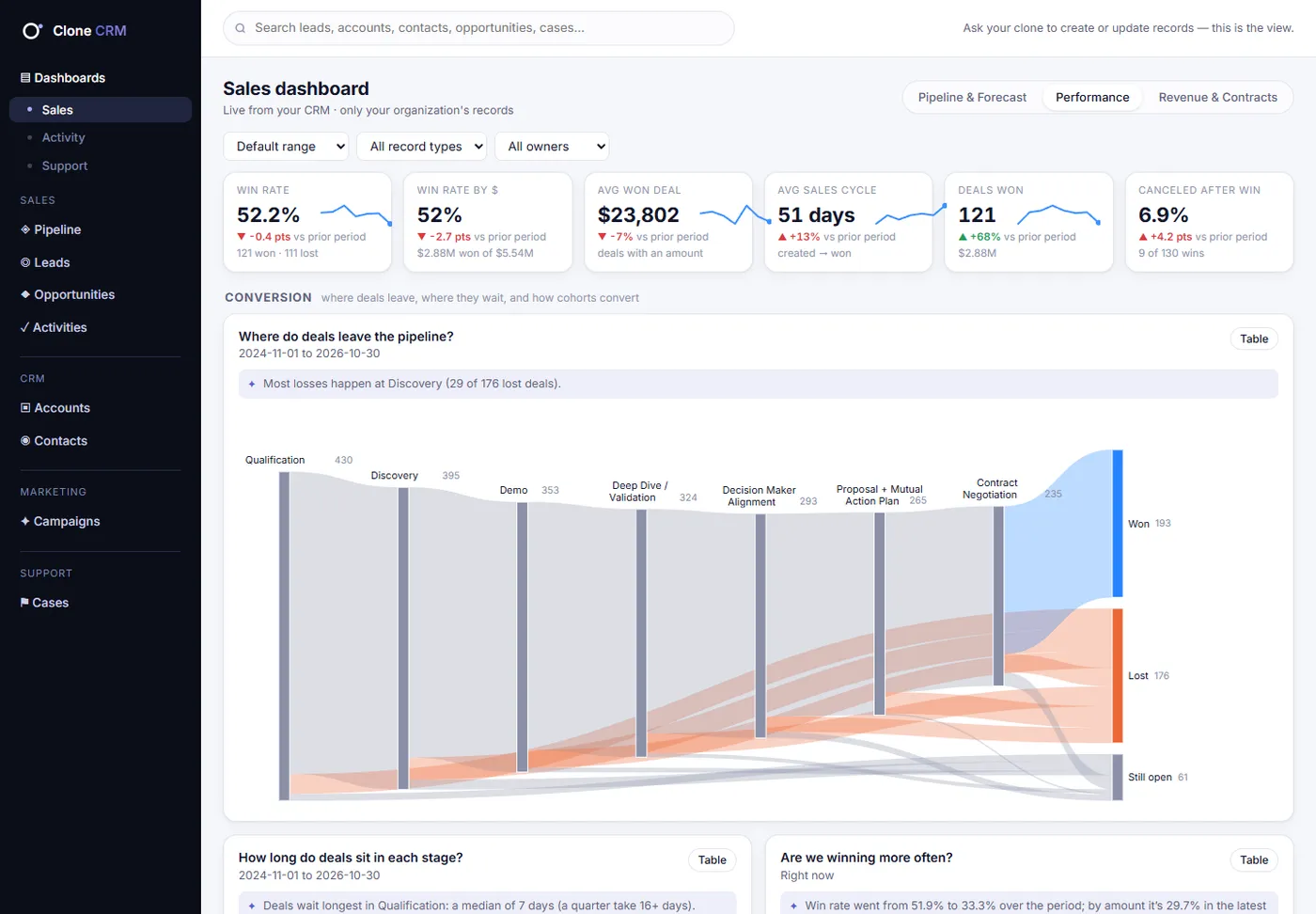
Sales · Performance
How well do we win, and why?
Sankey of where deals leave · Days per stage · Quarterly cohorts · Loss-reason Pareto · Owner radar
To-do list: Deals closing soon without a plan
crm.clone.org/dashboards/sales
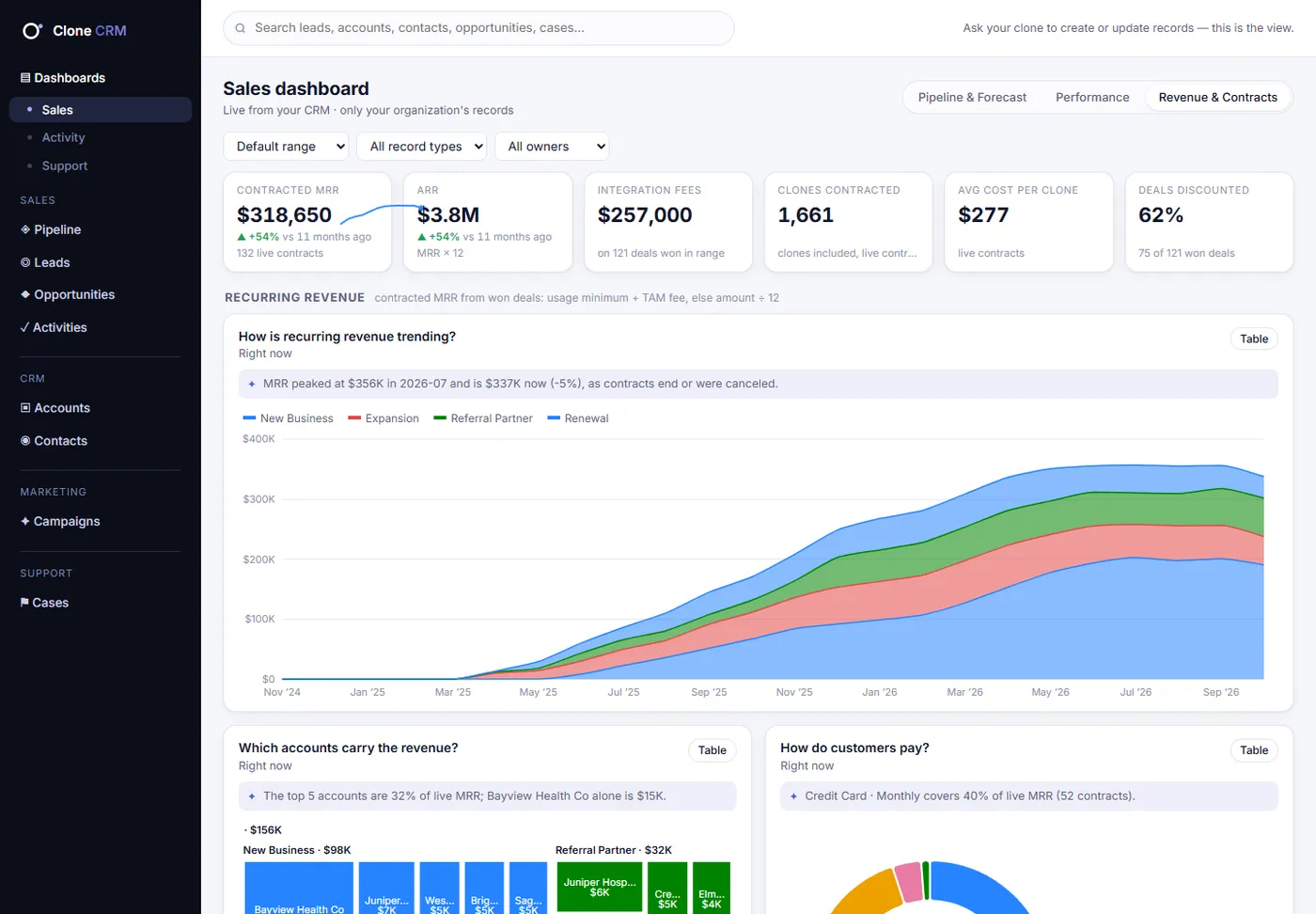
Sales · Revenue & Contracts
What are we earning, and what renews?
Recurring revenue over time · Revenue concentration treemap · 12-month renewal timeline · Partner and referral revenue
To-do list: Contracts ending in 90 days, with last contact
crm.clone.org/dashboards/sales
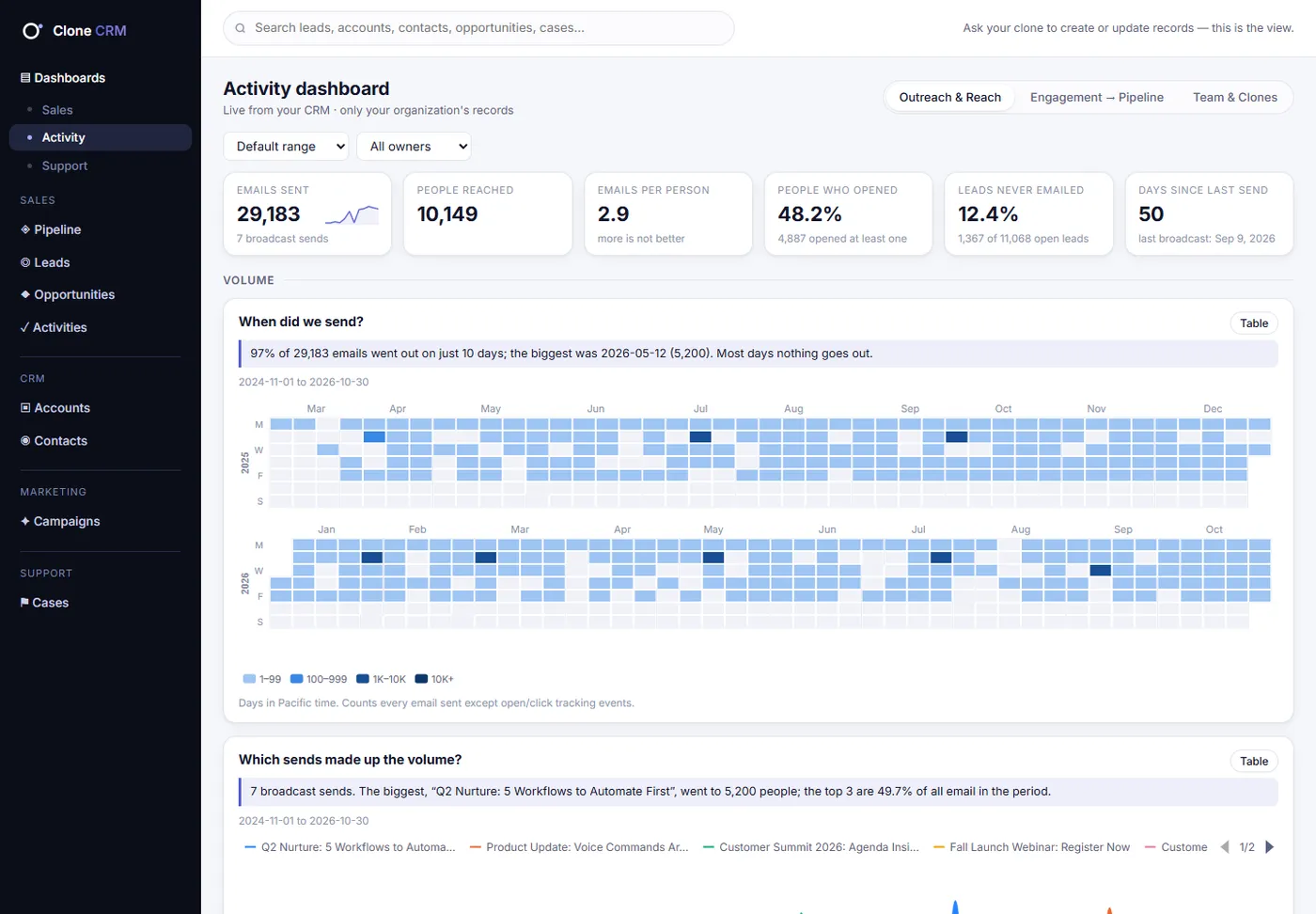
Activity · Outreach & Reach
How much did we reach, and whom?
Send calendar · Opens per send · Over-mailing check · Reach by industry and state
To-do list: High-fit leads nobody has contacted
crm.clone.org/dashboards/activity
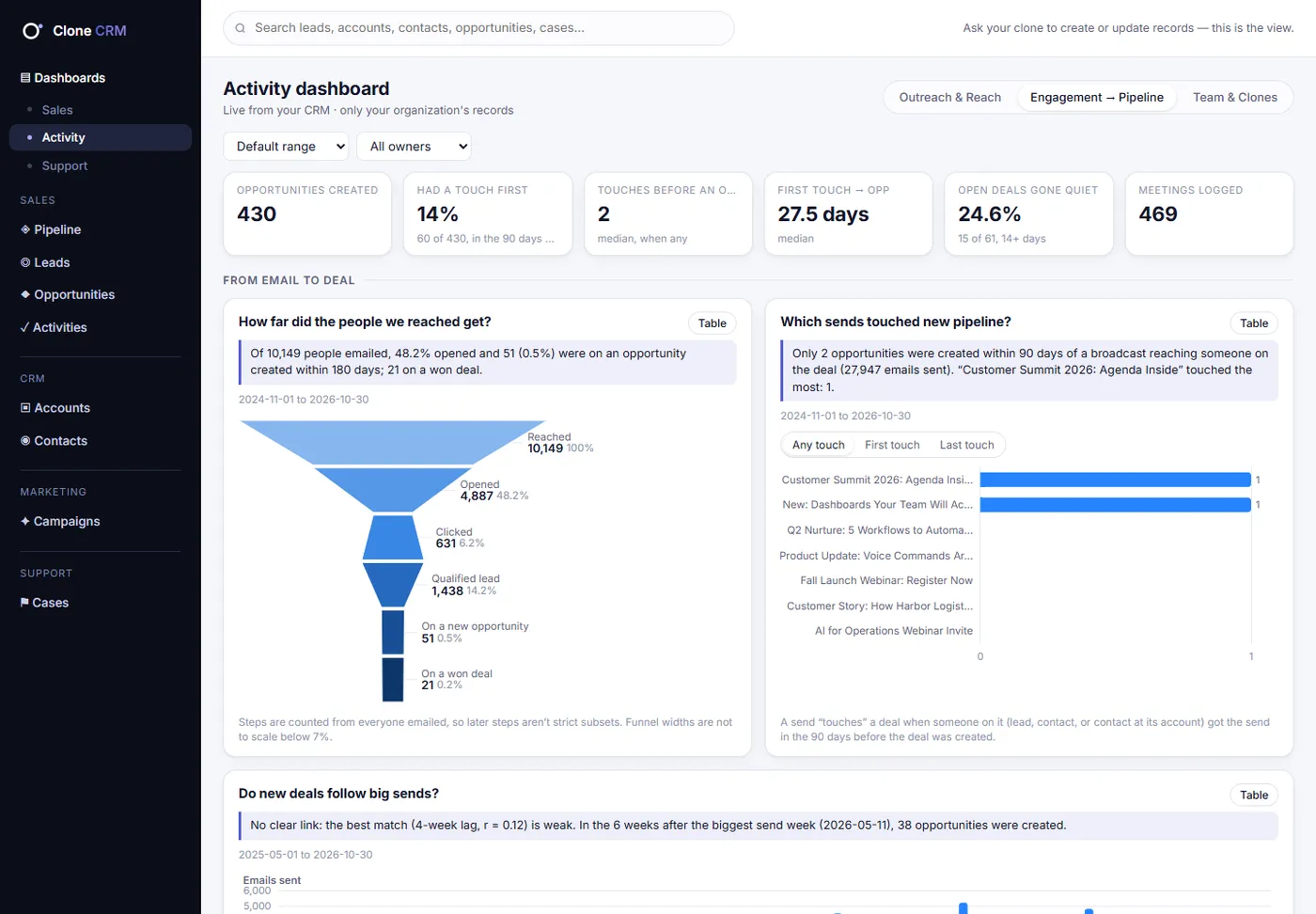
Activity · Engagement → Pipeline
Did the outreach move anything?
Reached → won funnel · Send-level attribution · Lag check · Activity on winners vs losers
To-do list: Open deals going dark
crm.clone.org/dashboards/activity
Activity · Team & Clones
Who is doing the work: people or Clones?
People vs Clones, week by week · When the team works · On-time task completion · Owner scorecard
To-do list: Overdue tasks, with a nudge to your Clone
crm.clone.org/dashboards/activity
Support · Health & Backlog
Are we keeping up?
Backlog by priority · Cases in vs out · Aging matrix · Service-target gauges
To-do list: At-risk and probably-stale cases
crm.clone.org/dashboards/support
Support · Flow & Speed
Where do cases wait?
Your real workflow as a Sankey · Time in each status · Feature-request funnel · Close-time spread
To-do list: Cases waiting longest
crm.clone.org/dashboards/support
Support · Product & Customers
What is breaking, and for whom?
Type → reason sunburst · Areas getting worse · Bug trend · Channel mix, clone chat included
Leads, accounts, contacts, opportunities with contact roles, cases with comments, campaigns with members, and activities. Lead conversion in one step.
Pipeline board
Drag deals between stages. Each stage carries its probability and forecast category, so forecasts fill themselves in.
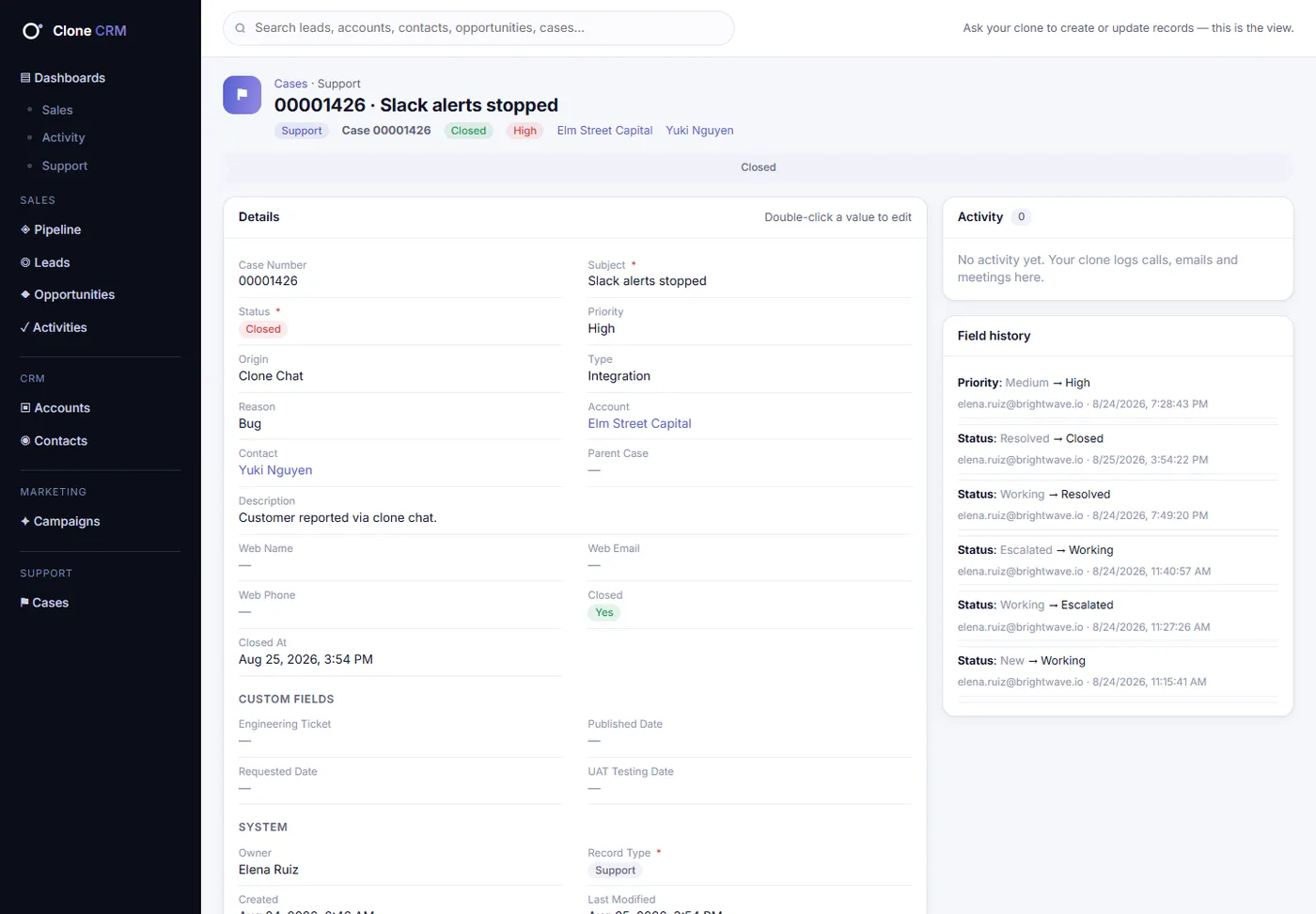
Cases + comments
Case numbers, priorities, origins, types and reasons. Internal or customer-visible comments and full status history.
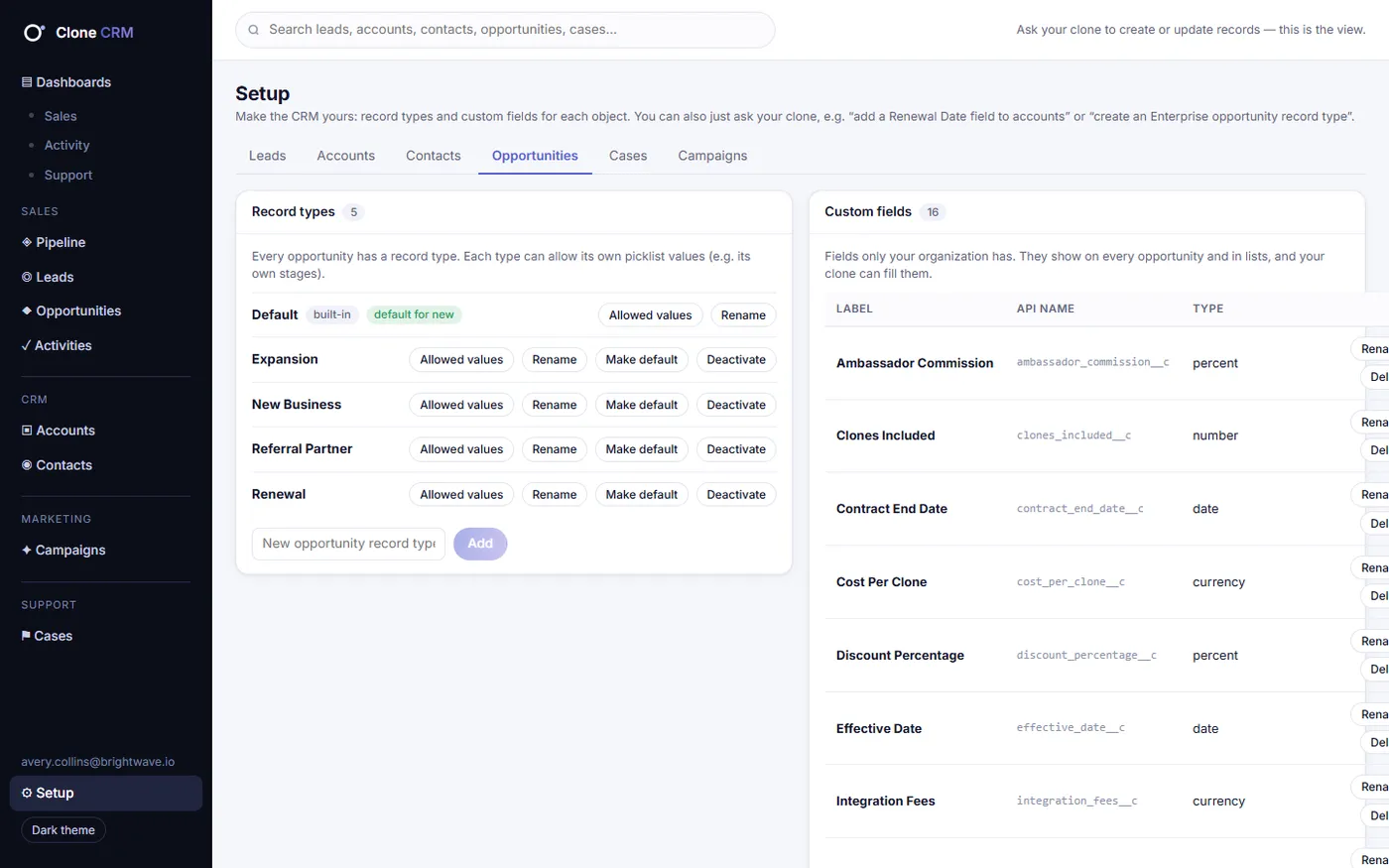
Record types
Every object starts with a Default record type. Add your own, each with its own picklist values and layout.
Custom fields
Fourteen field types, from currency to lookups. Created by asking your Clone, private to your organization.
Campaigns
Type, status, dates, budget and expected revenue, with members linked from leads and contacts.
History on everything
Stage, amount, owner and status changes with who and when, so dashboards show how work really moves.
Setup, two ways
Every record type, picklist and custom field in one place. Change them there, or just ask.
crm.clone.org
crm.clone.org
Different by design
A traditional CRM vs. Clone CRM.
A traditional CRMClone CRM
Who keeps it currentYour people, after every callYour Clone, as part of the job
How you update itForms, fields and clicksOne sentence, by voice or chat
Activity loggingManual, so it mostly doesn't happenAutomatic, from the conversation
Multi-step changesOne screen at a timeOne ask: log, move, task, done
Adding fields or record typesAn admin console and a consultantAsk your Clone
ReportsA blank report builderNine dashboards, and charts in chat
Help closing dealsA list of recordsA partner that flags risk and drafts the next move
SupportOften a separate productCases and comments built in
Proven on us first
We moved our own Salesforce in.
Clone CRM's importer was built on a real migration: ours. Records, cases, activity, record types, custom fields and history came across, and the dashboards lit up with years of real data on day one.
If it can carry a company's years of Salesforce history, it can carry yours.
Every record carries your organization's ID, and the database itself refuses to return another organization's rows, on every table. We test it on every change.
Verified identity on every request
Each request from your Clone carries a signed token from Clone Studio. Clone CRM checks the signature and never trusts an organization ID someone types in.
One-time sign-in links
Links in your Clone's replies work once and expire in 10 minutes. Old chats and shared screenshots never open your CRM to anyone else.
Clone CRM is the first CRM run entirely by Clones. Your Clone creates, updates, logs, converts and reports through one Clone Studio skill, by voice or chat, and the app at crm.clone.org is there whenever you want to look.
Do I ever have to use the app?
No. Most people mostly talk to their Clone. The app is there to browse lists, records, the pipeline board, cases and dashboards whenever you want to see things for yourself, and you can edit there too.
Can it really help me close deals?
Yes. Ask what's at risk and your Clone answers from your pipeline: stale deals, deals going dark, deals closing without a next step, renewals nobody has touched. Then it drafts the follow-up, the plan or the prep you need.
What if my Clone isn't sure which record I mean?
It asks. If a name matches two contacts, your Clone checks with you before changing anything, and it confirms before bulk changes to more than 10 records or any delete.
Who can see our data?
Only people in your organization. Separation is enforced by the database on every table, every request is identity-checked with a signed Clone Studio token, and links in chat are one-time sign-ins.
What's coming next?
Clones acting automatically when records change (for example kicking off onboarding when a deal is won), file attachments, saved views that follow you across devices, and team-level access controls.
Hire a Clone. Let it run your CRM.
See Clone CRM run on your own pipeline: talk to it, watch it work, and look at the dashboards it keeps current.