Your accounts. Your apps.Your keys.
Clone Social works the way n8n and Make do: you bring your own app. Your social accounts connect through developer apps you own, or a posting service you already use, so you stay in control of every permission.
- Facebook PageYour Meta appEncrypted
- InstagramYour Meta appEncrypted
- LinkedIn profileYour LinkedIn appEncrypted
- XYour X developer appEncrypted
- YouTubeYour Google Cloud appEncrypted
- TikTok via BlotatoYour Blotato keyEncrypted
Keys never shown again after saving. Never handed to clones. Revoke any time from the platform.
Safer for you. Better for your accounts.
Security
The app lives in your account, not ours. You decide its permissions and can revoke it any time, from the platform itself.
Control
When you connect, you pick exactly which pages and profiles Clone Social may use. Nothing else is touched.
No middleman
Your posts aren't routed through a shared app that a platform could throttle or suspend for everyone.
Your limits, your costs
Any API costs (X charges per post) and platform limits stay on your own account.
Encrypted
Keys and tokens are encrypted at rest, never shown again after you save them, and never handed to clones.
Clones never see your credentials
Clones only ever ask Clone Social to act. Clone Social checks the account's rules and posts through your app. Your keys never appear in a chat and never reach a clone.
Five steps, once for the whole workspace.
- Create your appIn your own Meta, X, LinkedIn or Google account. Or use your Blotato key.
- Save the keysEncrypted at rest and never shown again.
- Pick what it may useChoose exactly which pages and profiles Clone Social may use.
- Set the rulesDoes each account need approval? How should comment replies work?
- Give clones accessChoose which accounts each clone may draft for and publish to.
Step-by-step guides for every platform.
Every platform has a step-by-step setup guide on support.clone.org: Facebook, Instagram, X, TikTok and Threads.
Prefer to be walked through it? Ask your clone: “Walk me through connecting Facebook to Clone Social.”
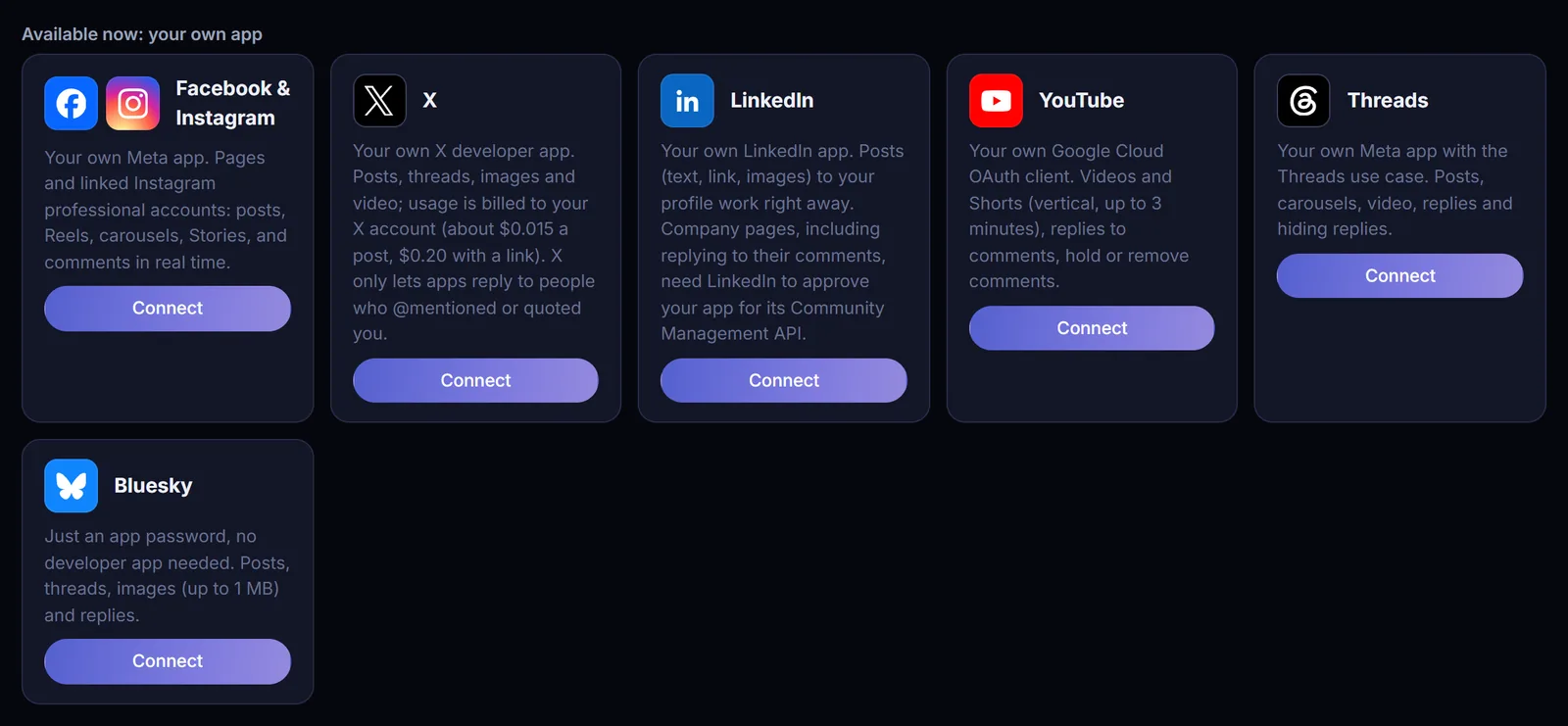
How each platform connects today.
- Posting
- Text, links, photos, multi-photo, video, Reels
- Comment replies
- Yes, real time available
- Posting
- Photos, carousels (up to 20), Reels, Stories
- Comment replies
- Yes, real time available
- Posting
- Text, images, carousels, video
- Comment replies
- Yes, plus hiding replies
- Posting
- Posts, threads, images, video
- Comment replies
- To people who @mentioned or quoted you
- Posting
- Your profile: text, links, images. Company pages need LinkedIn's approval
- Comment replies
- Company pages, once approved
- Posting
- Videos and Shorts
- Comment replies
- Yes, plus hold or remove
- Posting
- Posts, threads, images
- Comment replies
- Yes
- Posting
- TikTok, Pinterest, LinkedIn company pages and more
- Comment replies
- Instagram and Facebook
TikTok today connects through Blotato. A direct TikTok connection is coming; TikTok must audit each app before it can post publicly. Google Business Profile, Pinterest, Reddit and Snapchat require the platform to approve your app first.
The right people, the right rights.
Roles
The first person to sign in becomes the owner. Owners and admins give others roles: admin, approver, editor or viewer.
Approvals
Only approvers and above can approve posts and replies. Every account starts with “every post needs approval”.
Clone by clone
Choose which accounts each clone may draft for, and whether it may publish without approval.
One-time sign-in links
Say “Open Clone Social” and your clone sends a link that works once and expires in 10 minutes. You stay signed in for 7 days.
Activity log
Every action by every clone and person, with who approved it. Kept for your records.
Held, not lost
If an account disconnects, its posts wait. You're told, and they go out once you reconnect.
Security and your apps: questions, answered.
Why do I need my own app?
It keeps you in control and keeps your accounts safe: the app lives in your account, you can revoke it any time, and your posting isn't tied to anyone else's.
Do my clones see my keys?
No. Keys and tokens are encrypted at rest, never shown again after you save them, and never handed to clones. Clones only ever ask Clone Social to act.
Creating a developer app sounds hard. Can someone help?
Yes. Every platform has a step-by-step guide on support.clone.org, and your clone can walk you through it: ask "Walk me through connecting Facebook to Clone Social." Step-by-step guides for each platform are on support.clone.org.
I already use Blotato. Can I keep using it?
Yes. Connect your Blotato API key and use every account you've linked there, including TikTok, Pinterest and LinkedIn company pages.
Who pays for platform API usage?
You do, directly. Any API costs (X charges per post) or platform limits stay on your own developer account.
Who can approve posts?
The first person to sign in becomes the owner. Owners and admins give others roles: admin, approver, editor or viewer. Only approvers and above can approve posts and replies.
How do people sign in?
Say "Open Clone Social" to your clone. It sends a one-time sign-in link that works once and expires in 10 minutes. You stay signed in for 7 days.
Connect your own apps. Keep every key.
Start a free trial and connect your first account, or book a demo and we'll walk through setup with you.